
Buying or selling a car in Kenya? One of the most important steps you must not skip is the logbook transfer. Whether you're handing over keys to a buyer or taking ownership of a second-hand vehicle, the law requires you to complete this process — and do it fast.
Under Kenya's Traffic Act, the logbook transfer must be completed within 14 days of the vehicle sale. Failing to do so is a legal offence that can lead to penalties, insurance complications, and disputes over vehicle ownership.
The good news? The National Transport and Safety Authority (NTSA) has made the process fully digital through the eCitizen portal and the NTSA TIMS platform, meaning you no longer have to queue at a government office to get it done.
This guide walks you through everything — what a logbook is, what documents you need, the exact steps for both seller and buyer, transfer fees, and common mistakes to avoid.
For the latest automotive news, car-buying tips, and Kenyan road guides, stay connected with AutosKenya.com — your go-to source for everything wheels in Kenya.
What Is a Car Logbook in Kenya?
A logbook is an official document issued by the NTSA that serves as the legal proof of motor vehicle ownership in Kenya. Think of it as your car's "title deed."
It contains critical details, including:
- Vehicle Identification Number (VIN) — a unique code that distinguishes your vehicle
- Engine and Chassis Numbers — used to verify the vehicle's authenticity and prevent theft
- Make, Model, and Year of Manufacture
- Vehicle Colour
- Registered Owner's Name and Details
Transferring a logbook means officially updating these ownership details to reflect the new owner — making the buyer the legal owner in the eyes of the government.
Why Is the Logbook Transfer Mandatory?
Many Kenyans assume that once money has exchanged hands and keys have been passed over, the deal is done. That's a costly misconception.
Here's why completing the transfer matters:
- Legal ownership: Without a transfer, the original owner remains liable for the vehicle on government records.
- Insurance claims: Insurers may reject claims if the logbook still shows the previous owner's name.
- Police checks: During road checks, the registered name on the logbook must match the driver's documents.
- Avoid fines: Operating a vehicle without completing the transfer within 14 days is a traffic offence under Kenyan law.
Documents Required for Logbook Transfer in Kenya
Before you begin, gather the following documents. Missing even one can delay or derail the process.
For Individual Buyers and Sellers
- Original vehicle logbook (colour copy in PDF format for upload)
- National Identity Card (ID) — both buyer and seller
- KRA PIN Certificate — for both parties
- Sale Agreement — a signed document detailing the vehicle's make, chassis number, engine number, agreed price, and signatures of both parties
- Valid Insurance Certificate — proof of cover for the vehicle
- Form C (NTSA Motor Vehicle Transfer Form) — can be filled online
For Corporate Entities / Companies
- Certificate of Incorporation
- KRA PIN Certificate for the company
- Letter of Authority (if applicable)
- Form C
Additional Documents (Where Applicable)
- Loan Clearance Letter — if the vehicle had an outstanding loan or logbook loan
- Vehicle Inspection Report — required in some cases
Pro Tip: Ensure all documents are scanned clearly and saved in PDF format before starting the online process. Blurry or incomplete uploads are one of the most common reasons for rejection.
NTSA Logbook Transfer Fees in Kenya (2025)
Transfer charges are determined by the engine capacity of the vehicle. Here's what to expect:
Engine Capacity Transfer Fee (KSh) Up to 1,000cc From KSh 2,210 1,001cc – 1,500cc Mid-range fees apply 1,501cc – 2,000cc Mid-range fees apply 2,001cc – 3,000cc Higher fees apply Over 3,000cc Up to KSh 6,465- E-Sticker Fee: A one-off charge of KSh 750, regardless of engine capacity
- M-Pesa Transaction Fee: Approximately KSh 23–30
- Stamp Duty (for high-value vehicles): 4% of the vehicle's value, paid via KRA iTax
All payments are made digitally through the NTSA TIMS portal, using M-Pesa or mobile money.
Step-by-Step: How to Transfer a Car Logbook in Kenya
The logbook transfer is a two-part process:
- Part 1 — The seller (current owner) initiates the transfer
- Part 2 — The buyer (new owner) accepts the transfer
Both parties must have active eCitizen accounts. If you don't have one, visit accounts.ecitizen.go.ke to register.
PART 1: Seller's Steps — Initiating the Transfer
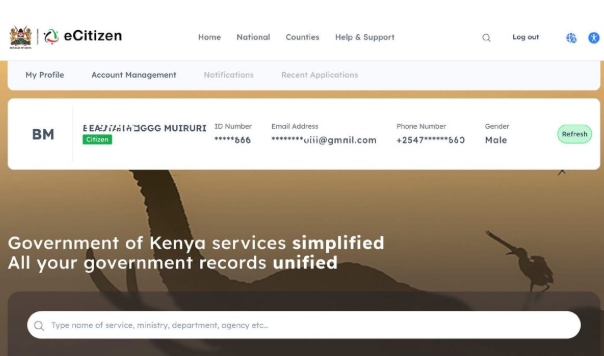
Step 1: Log Into Your eCitizen Account
Go to accounts.ecitizen.go.ke and sign in with your credentials. Confirm your details appear correctly on the dashboard.
Step 2: Navigate to the NTSA Portal
Once logged in, select the NTSA Service Portal (New) from the list of government services on your eCitizen dashboard.
Step 3: Select the Vehicle to Transfer
Scroll down on the NTSA dashboard to view the vehicles registered under your name. Click "View" next to the vehicle you wish to transfer.
Step 4: Go to Motor Vehicle Services
On the vehicle details page, click on "Motor Vehicle Services", then select "Vehicle Transfer" and click "Apply".
Step 5: Confirm Vehicle Details
Review all vehicle details displayed on the screen. Check the registration number, chassis number, and engine number carefully. Confirm they are accurate before proceeding.
Step 6: Answer the "Written Off" Question
You'll be asked whether the vehicle has been written off. In most cases, the answer is "No" — select the appropriate response.
Step 7: Upload the Logbook
Attach a coloured copy of the original logbook in PDF format. Ensure the scan is clear and all details are visible.
Step 8: Enter New Owner's Details
- Select the Type of Ownership (Individual / Non-Individual / Financial Institution)
- Enter the buyer's KRA PIN and click "Search" — the system will auto-populate the buyer's name and details
- Verify that the information displayed is correct
Step 9: Send a Verification Code
Navigate to Security Verification, select "Mobile", and click "Send Verification Code". Enter the code sent to your registered phone number.
Step 10: Preview, Agree, and Submit
Tick the disclaimer/declaration box, click "Preview" to review all details, and if everything looks right, click "Submit". This completes Part 1 of the transfer.
The buyer will now receive an SMS notification informing them that a vehicle transfer has been initiated in their name.
PART 2: Buyer's Steps — Accepting the Transfer
Step 1: Log Into Your eCitizen Account
Go to accounts.ecitizen.go.ke and log in.
Step 2: Navigate to NTSA Portal and Check Notifications
On the NTSA portal home page, look for a notification or consent request at the top of your dashboard. It will show the vehicle's registration number and the seller's name.
Step 3: Accept the Transfer
Review the details carefully. If everything is correct, click "Accept" to proceed. You can also Decline if there's an error — the seller will need to correct and resubmit.
Step 4: Provide Collection Details
- Select your preferred notification method (Email and/or SMS)
- Choose the NTSA Logbook Counter Collection Office where you'll pick up your new logbook
- Specify an Authorised Person to Collect the logbook (could be yourself or a representative with valid ID)
Step 5: Submit for Processing
Scroll down, tick the declaration box, click "Preview" to confirm all details, then click "Submit".
Step 6: Make Payment
The transfer fee will be calculated based on your vehicle's engine capacity. Pay via M-Pesa using the NTSA Paybill number shown on the portal.
NTSA will begin processing the new logbook. You'll receive an SMS and/or email notification once it's ready for collection — typically within 3–7 working days.
How to Collect Your New Logbook
Once NTSA notifies you that the logbook is ready:
- Visit the NTSA collection office you selected during the application
- Bring the original old logbook and your National ID (or the authorised person's ID if someone else is collecting)
- Present the documents to the NTSA officer for verification
- Receive your new logbook in your name — you're now the legal owner of the vehicle
The old logbook becomes invalid once the transfer is complete.
What Happens If the Transfer Is Rejected?
NTSA will notify you via SMS or portal notification with the reason for rejection. Common causes include:
- Unclear or incomplete document uploads — ensure PDFs are full-colour and legible
- Incorrect buyer details — double-check the KRA PIN and ID number
- Outstanding traffic fines — the vehicle must have no pending penalties
- Unresolved loan/logbook encumbrances — clear any financing first
The good news: rejected applications can be corrected and resubmitted at no additional cost.
What If the Seller Is Unavailable or Uncooperative?
This is a frustrating but not uncommon situation. If the seller is unreachable after a purchase, you can apply for a Forced Transfer through NTSA. This process involves additional documentation and verification, but it's a legitimate legal remedy for buyers stuck in such situations.
For detailed guidance on this, check out AutoMag Kenya's updated guide on car ownership transfers — a trusted resource for Kenyan motorists.
Common Mistakes to Avoid During Logbook Transfer
1. Delaying the process. The 14-day legal deadline is firm. Don't wait.
2. Using someone else's eCitizen account. Each party must log in using their own credentials.
3. Uploading black-and-white copies. NTSA requires a coloured PDF of the logbook.
4. Ignoring pending fines. Outstanding traffic violations linked to the vehicle can block the transfer.
5. Not verifying buyer details. A wrong KRA PIN will cause rejection and delays.
6. Skipping the sale agreement. This document protects both parties legally in case of a dispute.
Thinking of Buying a Second-Hand Car? Start Here
Once you've bought your car and completed the logbook transfer, you'll want peace of mind that you got a great deal. If you're still in the market, auto24.co.ke is a trusted platform for certified second-hand cars in Kenya, featuring a wide selection of verified models — from the fuel-efficient Toyota Vitz and Mazda Demio to the spacious Toyota Fielder, Nissan X-Trail, and the ever-popular Toyota Probox. Buying from a verified platform means you're less likely to encounter logbook complications from the start.
For more tips on what to look for when purchasing a used vehicle, explore our guide on best affordable cars for first-time buyers in Kenya.
Quick Summary: Logbook Transfer Checklist
Before you start, use this checklist:
- Both seller and buyer have active eCitizen accounts
- Original logbook scanned in colour (PDF format)
- KRA PINs for both buyer and seller available
- National IDs for both parties ready
- Sale agreement signed by both parties
- Valid insurance certificate in hand
- Any loan clearance letters obtained (if applicable)
- Transfer fee budget ready (KSh 2,210 – KSh 6,465 + KSh 750 e-sticker)
Frequently Asked Questions (FAQs)
Q: How long does the logbook transfer take in Kenya? Typically 3–7 working days after the buyer accepts and submits the transfer request.
Q: Can I do the logbook transfer without visiting an NTSA office? Yes. The entire process is done online via the eCitizen/NTSA portal. You only visit an office to collect the new logbook.
Q: Who pays the transfer fee — buyer or seller? The buyer pays the transfer fee, which is calculated based on the vehicle's engine capacity.
Q: What if I lost the original logbook? You'll need to apply for a logbook replacement at NTSA before initiating the transfer. This is a separate process.
Q: Is the transfer process the same for motorbikes? Yes, the process follows the same steps, though the fees differ. Motorbike transfers typically attract lower charges.
Final Thoughts
Transferring a car logbook in Kenya is no longer the paper-heavy, queue-inducing nightmare it once was. Thanks to the NTSA eCitizen platform, both buyers and sellers can handle the process entirely online — from anywhere in Kenya.
The key is to act quickly, gather the right documents, and follow each step carefully. Miss a detail, and you could face delays, rejections, or even legal trouble.
Whether you've just picked up a sleek second-hand Toyota Corolla Axio or a rugged Nissan X-Trail, getting the logbook in your name is the final step that makes the vehicle truly yours.
For more helpful guides tailored to Kenyan drivers — from car reviews and road trip tips to traffic law updates — keep visiting AutosKenya.com. And for more expert automotive advice, AutoMag Kenya is another excellent resource worth bookmarking.
Have you recently gone through the logbook transfer process? Share your experience in the comments below — your story might help another Kenyan driver navigate the process with ease!